Korea, Beyond SeoulRegional Cultural Compendium
Menu
Guide PDF
EN
Self-Service Seoul · Issue 04 Self-service city culture GPS: SEOUL 37.5665° N, 126.9780° E

Explore after dark, plan your return

SEOUL SELF-SERVICE
AFTER DARKALLEY

Photo booths, self-cook noodles and robot coffee reveal another side of Seoul. Check each branch’s hours, entry rules and payment methods before visiting.

Before you enter SELF-SERVICE
CHECK
Branch access
HOURS
Vary by branch
PAYMENT
Check acceptance
verified_user Scan every item, respect store rules and keep the operator’s contact details handy. Cameras and entry systems vary by store.
CARRY A BACKUP PAYMENT FOLLOW THE TERMINAL PROMPTS
Five self-service experiences

Five sides of Korea’s self-service culture

From a snack stop to a printed souvenir: choose an experience that fits your neighborhood and schedule.

ARCHIVE DECK 01 — 05 sensors
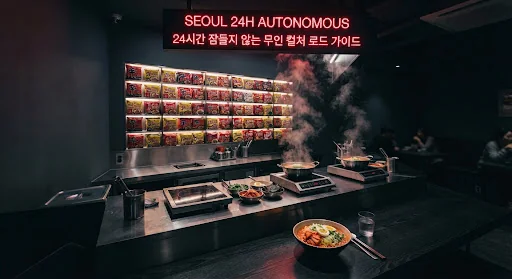
01 // NOODLE LABORATORY COOK YOUR OWN RAMYEON

Self-cook ramyeon café

Choose your noodles, pay for the bowl and toppings, then follow the cooker instructions. CU’s ramyeon-library concept is one example; self-cook does not always mean staff-free.

Price guide Check noodles + bowl + toppings
Cooking time Follow the packet and cooker
Topping options Availability and charges vary
Unmanned shops & kiosks
soup_kitchenHandle hot water and bowls carefully
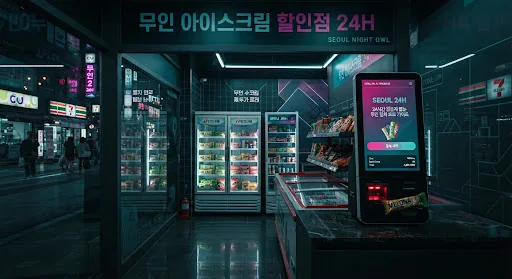
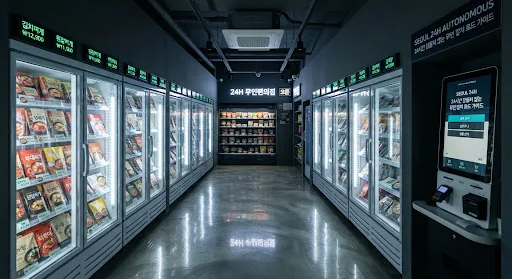
02 // SUB-ZERO SNACK ARCHIVE CHECK SHELF PRICES

Self-checkout ice cream & snacks

Browse the freezers, scan each item and confirm quantities on screen. Discount prices and overseas-card acceptance differ between shops.

  • check_circle Compare the shelf label with the checkout screen
  • check_circle Scan a bag too if the store charges for it
  • check_circle Take only paid items and close freezer doors
Unmanned shops & kiosks
A quick neighborhood snack stop
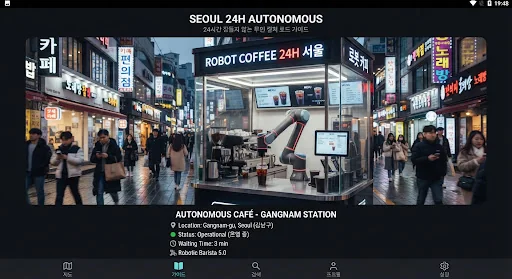
03 // ROBOTIC ESPRESSO precision_manufacturing

Robot coffee, made to order

Watch an automated coffee station prepare your drink. Choose the displayed menu and pickup method; machine features and public access vary by location.

Drink choices Check caffeine and ingredients
Pickup Follow the screen or receipt
Unmanned shops & kiosks
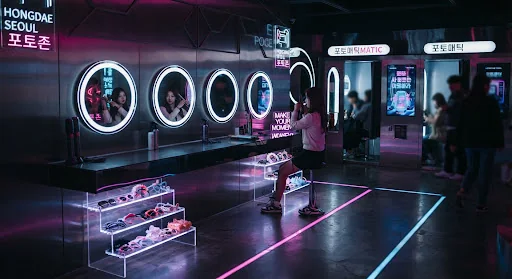
04 // SELF PHOTO BOOTH photo_camera

Self-service photo booth

Photoism and other photo-booth brands offer a short souvenir stop. Check the frame, number of prints, price and digital-download terms before paying.

Print and download Formats and QR terms vary
Props Follow the rules and put them back
Unmanned shops & kiosks
05 // SMART MEAL-KIT MART inventory_2

Meal kits & smart convenience

Meal kits can suit accommodation with a permitted kitchen. Check cooking equipment, refrigeration, expiry dates and allergens before buying; they are not necessarily ready to eat.

Meal options Check portion size and preparation
Freshness check Read expiry and storage labels
Unmanned shops & kiosks
terminal Visitor field manual

A traveler’s self-checkout guide

Three useful checks: item scanning, payment confirmation and branch entry. Interfaces and overseas-card support vary.

OVERSEAS-CARD SUPPORT VARIES
1

Scan items and follow card prompts

Scan or select every item, then check the quantity and total on screen before choosing payment.

barcode_scanner Present the barcode to the scanneras illustratedand confirm it was added once.
credit_card For a payment card,use the indicated orientationand leave it until the terminal tells you to remove it.
Choose the supported card-payment option CHECK TOTAL
2

Pay for every item and bag

Self-service stores may use cameras and remote support. Follow posted rules; the absence of a cashier does not change the need to pay.

videocam Keep the receipt or approval record until you have checked your purchase.
shopping_bag If bags are chargeable, add one to your bill before taking it.
Ask the operator if the bill is unclear RESPECT STORE RULES
3

Check entrance requirements first

Some stores lock their doors or require a supported card, app or local phone. Opening hours and entry systems are branch-specific.

lock_open At the entrance terminal,read the listed requirementsand contact the operator if your method is unsupported.
badge Do not assume an overseas card or passport will unlock the door. Never force entry or follow another customer through a locked door.
Choose another open store if needed ACCESS VARIES
Flexible neighborhood route

Two areas for a self-service stop

Try these neighborhoods in the afternoon or evening. Confirm individual shops and your return transport rather than relying on a fixed overnight itinerary.

01
Photoism: find a Hongdae branch FIRST STOP

Pick a nearby booth using the official branch list. Check the frame and payment options; props and print formats vary.

Use the official branch locator PHOTO BOOTH
02
CU Hongdae SangSang ramyeon library NEXT STOP

Browse the noodle shelves and check self-cooking instructions. Pay for the noodle, bowl and any toppings. This is a self-cook experience, not a guarantee of staff-free service.

CU Hongdae SangSang · check map SELF-COOK RAMYEON
03
Self-checkout snack stop OPTIONAL

Choose a nearby ice-cream or snack shop that is open. Check prices and payment before scanning; do not detour to an unverified late-night branch.

Choose an open branch nearby SNACKS
directions_walk Check opening hours, streets and your final train or taxi before heading out.
View area on map
support_agent Korean for troubleshooting

Useful phrases when a machine fails

Show or copy these Korean phrases when contacting the store’s posted support number. Keep the receipt and payment record.

COPY KOREAN PHRASE
CASE 01 content_copy

Charged, but no item

Payment or dispensing problem

"결제는 되었는데 상품이 나오지 않았어요. 확인해 주세요."
Robot café / vending machine Copied ✓
CASE 02 content_copy

Overseas card not accepted

Ask about another supported method

"해외 카드가 인식되지 않아요. 다른 결제 방법이 있나요?"
Self-cook noodles / snacks Copied ✓
CASE 03 content_copy

Photo did not print

Reprint or refund request

"사진이 인쇄되지 않았어요. 재출력이나 환불을 부탁드려요."
Self-service photo booth Copied ✓
CASE 04 content_copy

Entrance will not open

Contact the store operator

"출입문이 열리지 않아요. 어떻게 해야 하나요?"
Stores with entry controls Copied ✓
Practice self-checkout

A sample kiosk, with no real payment

Tap sample items, check quantities and practise the total-and-confirm flow. This demo is not a real payment terminal or an exact copy of a store system.

wifiPRACTICE DEMO · NO PAYMENT
SAMPLE CHECKOUT TAP TO ADD
Tap an item to practise adding it to the bill.
Sample total ₩0
Self-service city notes

A small everyday adventure: choose a nearby shop, read its instructions and enjoy Seoul’s self-service culture at your own pace.